 The Good Sign Company
Storage-bin label workflow comparison
Label Maker Tape vs Printable Paper Inserts for Storage-Bin Sign Holders
Keep the holder constant and choose the message workflow. Label-maker tape suits short, fast identifiers when the device, tape width, and type size fit the holder. Printable paper inserts suit longer wording, larger type, icons, and coordinated batch changes—but add template, printing, and trimming work.
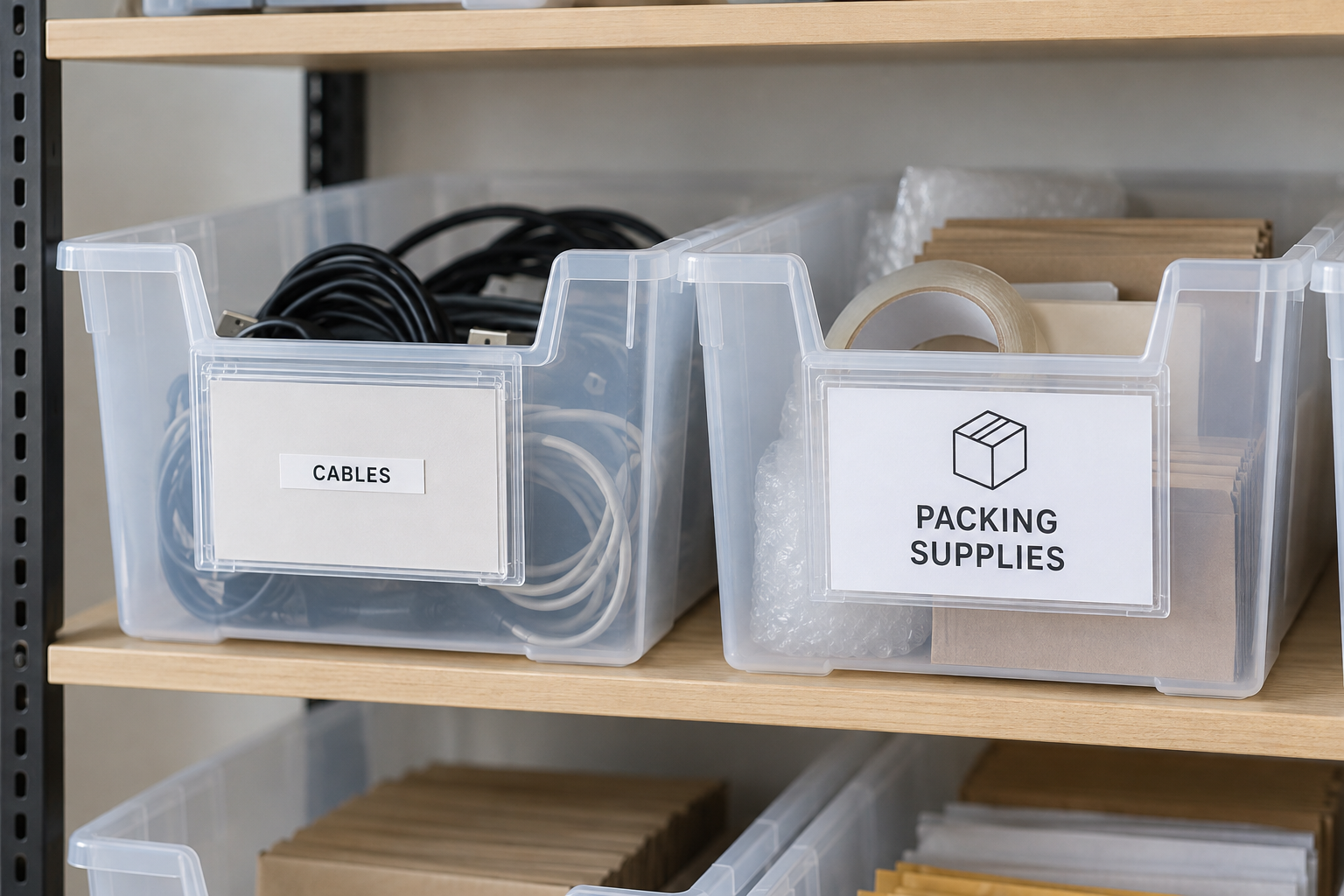
Compare the workflow, not just the supply
Measure the holder's visible window and loading opening. Then compare those dimensions with the tape width, removable backing card, paper size, printer margins, and finished trimming plan for the exact products.
The short answer
Choose label-maker tape when labels are brief, one or a few bins change at a time, and the device can produce readable type that fits a removable card inside the holder.
Choose printable paper inserts when messages need larger type, two lines, an icon, consistent layout, or coordinated updates across many bins.
Choose neither yet when the holder's visible and loading dimensions are unknown, the tape would be applied directly to an unverified bin surface, or no one owns the template and replacement routine.
Decision table
| Decision | Label-maker tape on insert card | Printable paper insert |
|---|---|---|
| Best message shape | Short names, codes, or one-line identifiers | Longer names, two-line labels, icons, or grouped information |
| Update pattern | Fast individual changes near the storage area | Coordinated batches prepared from one file |
| Equipment | Compatible label maker, tape, and removable backing cards | Printer, paper or cardstock, template, and trimming method |
| Main fit check | Tape width and type size within the holder's visible window | Finished insert dimensions, printer margins, and loading clearance |
| Main maintenance risk | Inconsistent abbreviations or tapes that obscure the backing card | Lost templates, inconsistent trimming, or stale batch files |
1. Confirm one holder accepts both routes
Start with a holder whose maker documents a replaceable insert and provides exact insert or loading dimensions. For the tape route, place the tape on a removable card sized for that holder unless the holder maker explicitly supports another method. This keeps the comparison about message production and avoids assuming adhesive compatibility with the bin.
Measure the visible window separately from the loading opening. A card can fit through the opening while important text remains hidden behind a frame edge.
2. Test the longest real message at actual size
A label maker is strongest when the vocabulary is short and predictable. Check the supported tape width, character limits, font controls, and the printed sample at the actual viewing distance. Avoid abbreviations that only one employee understands.
A printable insert can use a larger type hierarchy, line breaks, and a simple icon, but the design still has to fit the visible window. Print at 100% scale, trim one sample, load it, and test it on the shelf before building the full set.
3. Match the tool to update volume
For isolated changes, a nearby label maker can remove the delay of opening a file and running a print job. For a reset involving dozens of bins, a maintained spreadsheet or template can make paper inserts easier to review and produce as a consistent batch.
Count the full steps: entering text, checking wording, printing, trimming, loading, and disposing of the old insert. The faster tool is the one that fits the team's actual change pattern, not the one with the fewest advertised features.
4. Plan setup and maintenance ownership
Store the label maker, compatible tape, blank backing cards, or paper stock where the assigned operator can find them. For printable inserts, keep the approved template and current source list in a known location, with page size and print-scale instructions.
Set a simple review trigger when contents, locations, or naming conventions change. Neither method fixes an inventory process by itself, and this comparison does not establish barcode or inventory-system compatibility.
Who each option fits
- Label-maker tape fits small studios, stockrooms, and workrooms with short bin names and occasional one-at-a-time changes.
- Printable inserts fit teams that need larger type, consistent categories, two-line wording, icons, or planned batch resets.
- A mixed system fits only when a documented naming rule makes the difference obvious—for example, printed category inserts with short temporary identifiers on removable cards.
When to skip each option
- Skip label-maker tape when the available tape width forces unreadably small type, the message needs several lines, or the device cannot produce a consistent approved format.
- Skip printable inserts when there is no reliable printer, trimming method, accessible source file, or owner for future updates.
- Skip both for now when the holder fit is unverified, the normal viewing distance makes either sample hard to read, or labels change faster than the underlying naming process can be maintained.
- Use product-specific guidance for adhesive surfaces, cleaning, temperature, moisture, chemical exposure, or specialized storage conditions; do not infer suitability from the general label format.
Buying checklist
- Holder loading dimensions and visible window
- Longest real category name and normal viewing distance
- Supported tape width, device controls, and compatible supply reference
- Backing-card dimensions for the tape route
- Printer paper compatibility, margins, and scale setting
- Paper weight or thickness accepted by the holder
- Repeatable cutting or trimming method
- Expected update volume and named maintenance owner
- Saved naming convention, template, and replacement supplies
Continue the decision
If the holder itself is not settled, start with the storage-bin label-holder guide. When tape has won and the machine is already known, compare replacement label-tape cartridges by documented family, width, installed fit, and reorder workflow. For a broader workplace message and update plan, use the small-business sign planning guide. If the labels belong on a shelf edge instead of a bin holder, compare hook-on and adhesive shelf label holders. For frequently replaced counter sheets rather than bin labels, compare paper trimmers for sign inserts.